PayPal
Available from Version: 20260629 (PayPal ePayments via MarketPay)

|
PayPal is an alternative payment method offered by 7 million businesses around the world, and has more than 200M active accounts. |
PayPal general properties
| Operating countries | Global (200+ countries) |
| Currency | EUR, USD, DKK, NOK, SEK, GBP, CAD, AUD, CHF, PLN, and other major currencies supported by PayPal |
| Minimum transaction amount | 0.01 in the transaction currency |
| Maximum transaction amount | Subject to PayPal account and merchant configuration limits |
| Refund |
|
| Chargeback | Yes (PayPal Buyer/Seller Protection rules apply) |
| Integration category | Asynchronous |
PayPal Specific Notes
- After 29 days PayPal cancels any authorisation that has not yet been captured.
- After 3 days, an authorisation expires. You can still capture the transaction, but there's a higher risk that the capture is declined, for example due to insufficient funds.
- For refunds of partial captures, each refund cannot be greater than the largest partial capture. For example, if you make two partials captures of $40, and $30, and later want to make a refund of $60- you first have to refund $40, and then $20.
- For addresses in the United States, the Region parameter is represented by a two character ISO abbreviation. For more information, see https://en.wikipedia.org/wiki/ISO_3166-2:US.
- You can only use the same shop_orderid one time, if the transaction was successful.
- The order line items must add up to the amount on the payment.
Agreements with PayPal
- Only the recurring ones are supported.
- You should provide us with order line information for the subsequent payments on a recurring agreement.
Seller Protection Notes
You're eligible for this only when providing a shipping address as part of the order lines, and it's applicable when the order consists of physical goods. Keep in mind that the shipping address is not mandatory, so this is opt-in feature.
 Scope of Integration
The following features are not supported:
How it works
The processing of payments for goods using PayPal consists of one step, during which the capture or reservation of the payment takes place.
The following diagram illustrates the steps involved in making payment that are relevant to you as a merchant.
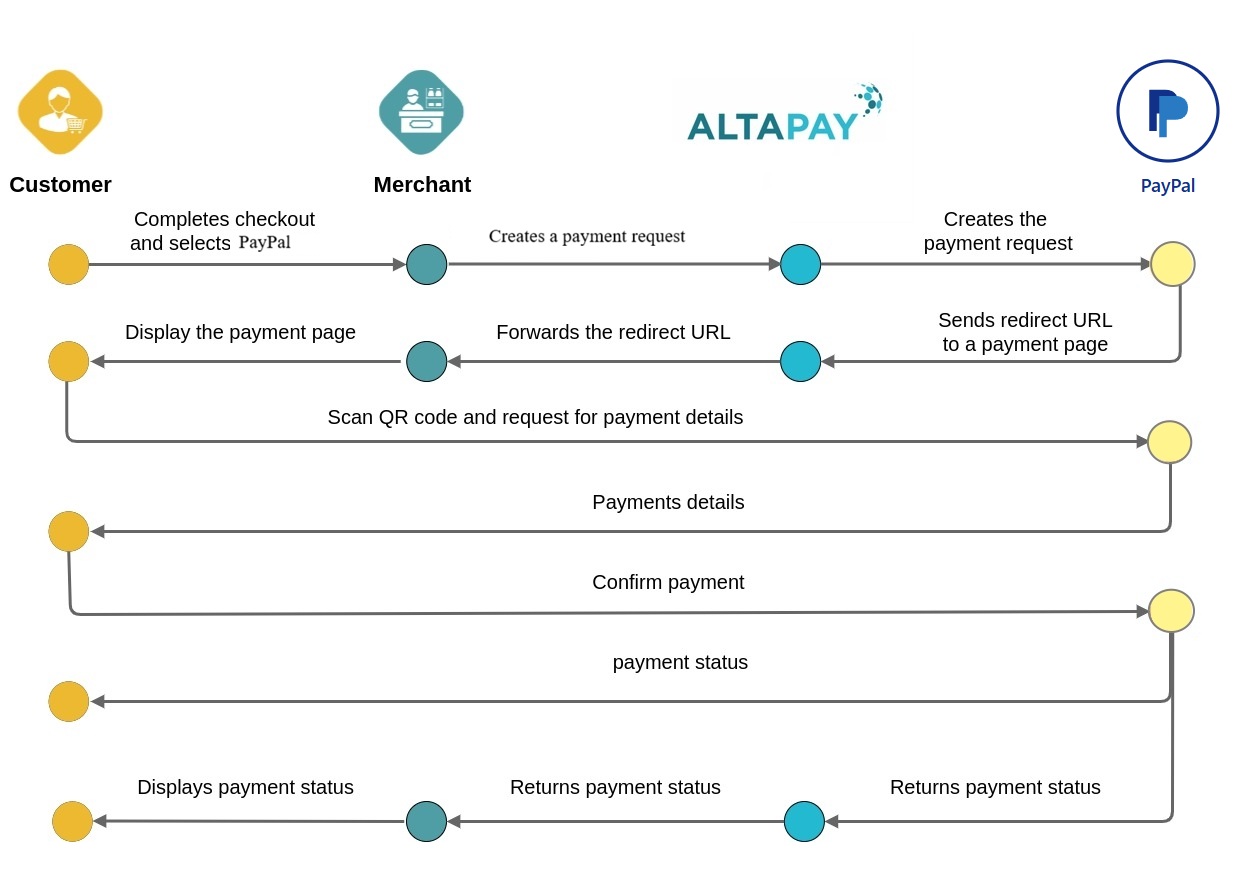
- The customer selects PayPal during checkout.
- The merchant creates a payment request through AltaPay.
- AltaPay forwards the payment request to PayPal.
- PayPal returns a redirect URL.
- The customer is redirected to the PayPal application.
- The customer reviews and confirms the payment.
- PayPal processes the payment.
- AltaPay receives the payment result.
- The merchant receives the payment status.
- The customer is redirected back to the merchant website.
Integration Scenarios
Checkout
Our Checkout API solution supports PayPal out of the box, meaning that it works as any other payment method. Whenever PayPal is enabled / configured on your terminal, it will be returned as an available payment method.
Merchant API
To find out how to integrate with PayPal directly to the Gateway using our merchant API, see Integrating using the Merchant API.
- Pre-step: Setting up a server-to-server session. Create a session containing all information needed to process the payment (except for the payment instrument data). This call returns a session ID required in the next call. For more details on setting the checkout session, see checkoutSession.
- Transaction Execution: Provide the payment details in a second server-to-server call on the gateway endpoint to create a payment request with the createPaymentRequest method.
Setting parameters in createPaymentRequest Request
See the mandatory and configurable parameters by selecting PayPal in the drop down list on the Create Payment Request page
Processing a Capture
Capture takes place after the reservation of funds. There are several capture scenarios:
- Full capture, where funds are taken for the entire transaction
- Partial capture, where funds are taken for some of the order lines
Processing a Refund
Refunds take place after the capture of funds. There are several refund scenarios:
- Full refund, which returns the funds for the entire transaction
- Partial refund, which returns the funds for some of the order lines
Setting parameters in refundCapturedReservation Request
See the mandatory and configurable parameters by selecting PayPal in the drop down list on the Create Refund Request page
Test the integration
You can test the PayPal integration with us by using the AltaPay Sandbox. In order to do this, please check ePayment test integration page.